Traefik

Traefik is the beating heart of my homelab. Every connection comes into traefik which then routes the traffic to the application being requested/served
I have a domain with Cloudflare and have created subdomains for all of my services.
It also uses Lets Encrypt and provides a valid SSL certificate
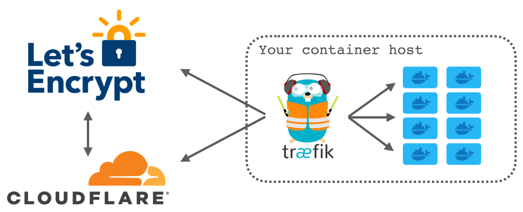
With Traefik, I also have the ability to specify multiple entry points (2 internal and 2 external) This allows me to keep my internal services internal and only have my external services showing to the world.
The section Traefik Entry Points will explain more about these.
docker-compose.yml
Below is the Docker Compose file (you will notice this also includes Portainer) Sensitive information is placed in a hidden .env file which is then referenced within the docker-compose.
networks:
  proxy:
    external: true
  monitoring:
    external: true

services:

  traefik:
    image: ghcr.io/traefik/traefik
    container_name: traefik
    restart: unless-stopped
    networks:
      proxy:
        ipv4_address: "172.19.0.2"
      monitoring:
        ipv4_address: "172.18.0.2"
    healthcheck:
      test: ["CMD", "traefik", "healthcheck", "--ping"]
      interval: 30s
      timeout: 10s
      retries: 3
      start_period: 30s
    ports:
      - 80:80
      - 81:81
      - 443:443
      - 444:444
      - 8088:8088
      - 25565:25565
    mem_limit: 2g
    mem_reservation: 128m
    environment:
      - CF_API_EMAIL=${CF_API_EMAIL}
      - CF_DNS_API_TOKEN=${CF_DNS_API_TOKEN}
    volumes:
      - /etc/localtime:/etc/localtime:ro
      - /var/run/docker.sock:/var/run/docker.sock:ro
      - /ssd/docker/appdata/traefik/data/traefik.yml:/traefik.yml:ro
      - /ssd/docker/appdata/traefik/data/acme.json:/acme.json
      - /ssd/docker/appdata/traefik/dynamic:/ssd/docker/appdata/traefik/dynamic
      - /ssd/docker/appdata/traefik/logs:/var/log/traefik
    labels:
      - traefik.enable=true
      - traefik.http.services.traefik.loadbalancer.server.port=8080
      - traefik.http.routers.traefik_https.rule=Host(`subdomain.domain.co.uk`)
      - traefik.http.routers.traefik_https.entrypoints=websecure-int
      - traefik.http.routers.traefik_https.tls=true
      - traefik.http.routers.traefik_https.tls.certresolver=production
      - traefik.http.routers.traefik.tls.domains[0].main=domain.co.uk
      - traefik.http.routers.traefik.tls.domains[0].sans=*.domain.co.uk
      - traefik.http.routers.traefik_https.service=api@internal

  portainer:
    image: portainer/portainer-ee:lts
    container_name: portainer_T
    networks:
      proxy:
        ipv4_address: "172.19.0.3"
    command: -H unix:///var/run/docker.sock
    restart: unless-stopped
    volumes:
      - /var/run/docker.sock:/var/run/docker.sock
      - /ssd/docker/appdata/portainer/data:/data
    labels:
      - traefik.enable=true
      - traefik.http.services.portainer.loadbalancer.server.port=9000
      - traefik.http.routers.portainer.rule=Host(`subdomain.domain.co.uk`)
      - traefik.http.routers.portainer.entrypoints=websecure-int
      - traefik.http.routers.portainer.tls=true
      - traefik.http.routers.portainer.tls.certresolver=production
      - traefik.http.routers.portainer.tls.domains[0].main=domain.co.uk
      - traefik.http.routers.portainer.tls.domains[0].sans=*.domain.co.uk
traefik.yml
The traefik.yml file lives inside the "data" directory and is used to:
enable/disable the dashboard, define entry points, assign middleware at a global level (rather than at an application level), specify your certificate resolver details, detail your docker provider and the docker socket address as well as dynamic files/directory location. Finally you can also, optionally, provide the location of log files and details of any collector of metrics.
global:
  checkNewVersion: true
  sendAnonymousUsage: false

api:
  dashboard: true
  debug: true

ping: {}

entryPoints:

#internal
  web-int:
    address: :80
    http:
      redirections:
        entryPoint:
          to: websecure-int
          scheme: https

  websecure-int:
    address: :443
    http:
      middlewares:
        - global-default-headers@file
      encodedCharacters:
        allowEncodedSlash: false
        allowEncodedBackSlash: false
        allowEncodedNullCharacter: false
        allowEncodedSemicolon: false
        allowEncodedPercent: false
        allowEncodedQuestionMark: false
        allowEncodedHash: false

#external
  web-ext:
    address: :81
    http:
      redirections:
        entryPoint:
          to: websecure-ext
          scheme: https

  websecure-ext:
    address: :444
    forwardedHeaders:
      trustedIPs:
        - "172.19.0.0/24"
        - "10.36.100.0/24"
    http:
      middlewares:
        - global-default-headers@file
      encodedCharacters:
        allowEncodedSlash: false
        allowEncodedBackSlash: false
        allowEncodedNullCharacter: false
        allowEncodedSemicolon: false
        allowEncodedPercent: false
        allowEncodedQuestionMark: false
        allowEncodedHash: false

#prometheus
  metrics:
    address: :8088
    http:
      encodedCharacters:
        allowEncodedSlash: false
        allowEncodedBackSlash: false
        allowEncodedNullCharacter: false
        allowEncodedSemicolon: false
        allowEncodedPercent: false
        allowEncodedQuestionMark: false
        allowEncodedHash: false

#minecraft
  minecraft:
    address: :25565

certificatesResolvers:
  production:
    acme:
      email: xander.france@gmail.com
      storage: acme.json
      dnsChallenge:
        provider: cloudflare
        resolvers:
          - "1.1.1.1:53"
          - "1.0.0.1:53"

serversTransport:
  insecureSkipVerify: true

providers:
  docker:
    endpoint: unix:///var/run/docker.sock
    exposedByDefault: false
  file:
    directory: /ssd/docker/appdata/traefik/dynamic/
    watch: true

log:
  level: "INFO"

accessLog:
  filePath: "/var/log/traefik/access.log"
  format: json
  filters:
    statusCodes:
      - "400-599"

metrics:
  prometheus:
    addRoutersLabels: true
    addServicesLabels: true
    entryPoint: metrics
    buckets:
        - 0.1
        - 0.3
        - 1.2
        - 5.0
Traefik Dashboard
Care should be taken to ensure you are not exposing your dashboard to the wider internet.
The dashboard will allow you to see the entrypoints and ports configured, browse your configured routers, services and middlewares whilst also giving you an at a glance view of what's configured successfully and what's not.
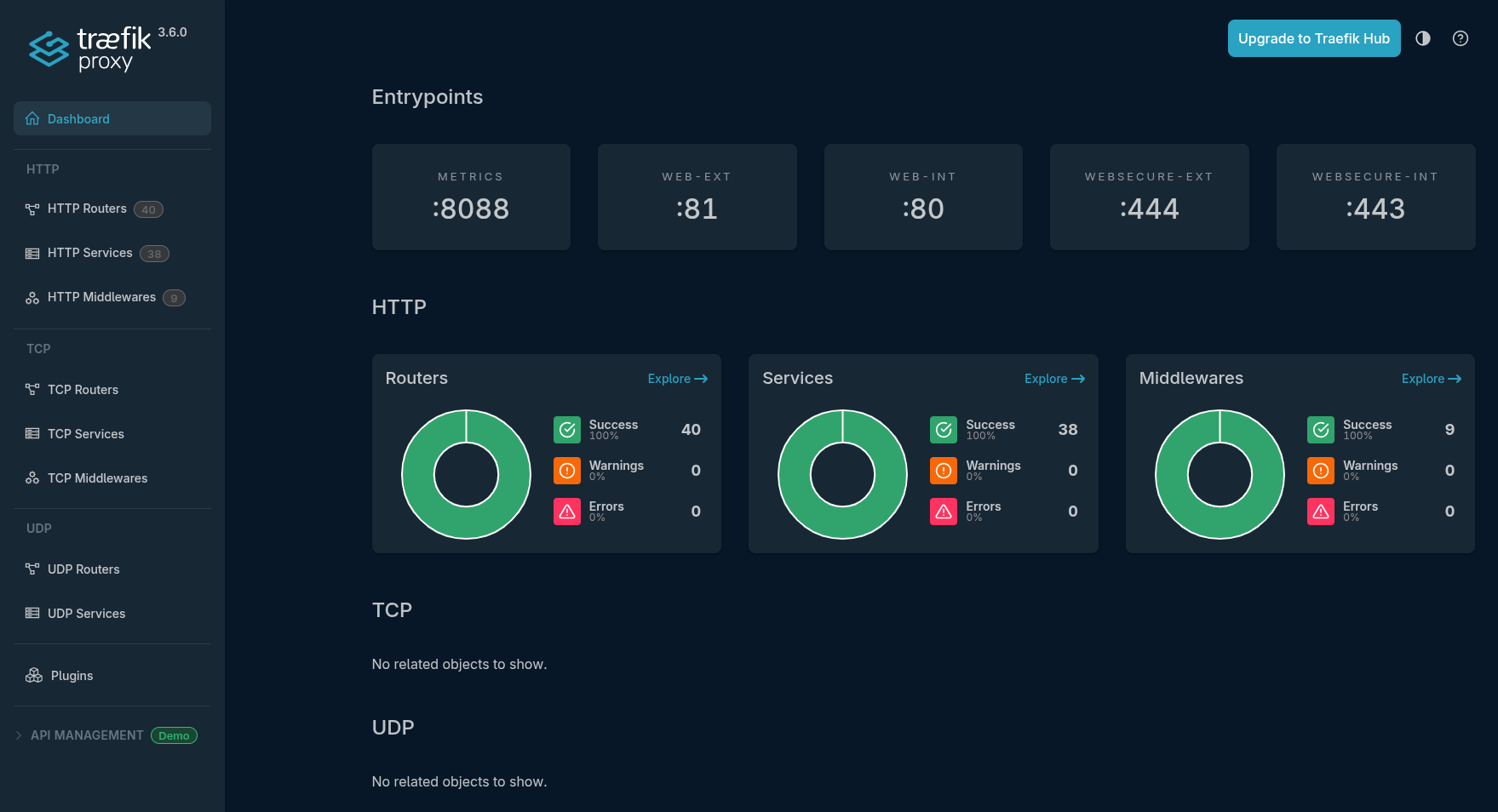
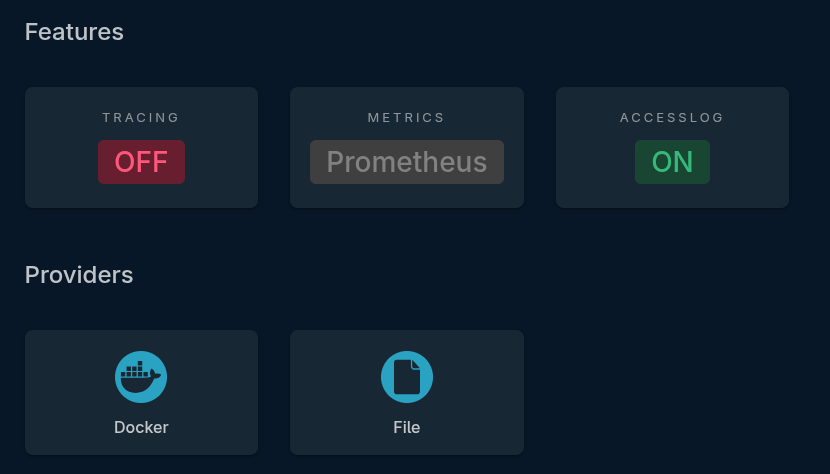
The lower portion of the dashboard will also show you your configured features and providers
Dynamic Files Directory
Traefik will allow you to provide a single file as a provider of Routers, Middlewares and Services.
What I have selected to do, as you will see in the Dynamic Files section, is specify a directory where multiple dynamic files can be placed and this directory is watched by Traefik for new files and/or changes to existing files.
Dynamic files can be very useful for services that are running on other hosts and are/aren't running in docker
As its "dynamic" you can make changes to these files and they will instantly take effect without needing to restart traefik
The section Traefik Dynamic Files goes into more detail about these files and shows examples.